Customer services · Artwork

Logo & artwork guidelines.

The file types we need for print, dye sublimation and embroidery, plus a simple explanation of vector and raster artwork.

Embroidery

All file types accepted.

Embroidery artwork follows a different production process from printed artwork.

Artwork is digitised for stitching

For embroidery requests, we accept all file types. However, a setup fee applies for digitising designs regardless of format. We digitise and convert your design so that it can be reproduced as individual stitches for embroidery.

Understanding artwork

Vector vs raster.

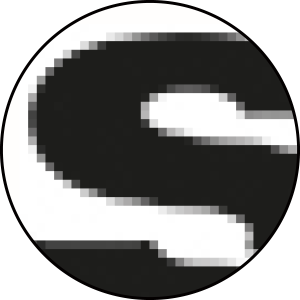
The simplest way to understand the difference is to look at what happens when each file type is enlarged.

Vector

Stays sharp when resized

Think of vector artwork like an elastic shape that can stretch without losing its form or clarity. No matter how much you enlarge a vector file, it remains sharp and clear. This makes vector formats ideal for logos and designs.

Raster

Made from pixels

Raster artwork behaves more like a photograph. If you enlarge a small image too far, it can become blurry or pixelated. Raster formats are ideal for photographs but are generally less suitable for logos and production artwork.

Vector artworkExample enlarged by 300%
Logo vector resolution example enlarged by 300 percent
Raster artworkExample enlarged by 300%
Logo raster resolution example enlarged by 300 percent

Keep the original artwork

It is good practice to keep original copies of your artwork stored securely. If you are unsure which file type to provide, contact our team and we will work with you to make sure you supply the most suitable artwork.

Tip

Whenever you have a design created, ask for an editable vector version. This can save time later if you need to enlarge or change the artwork without losing quality.

Need something else?

More help from Surridge Sport customer services.

Basket loading...


Please wait...large baskets may take a moment to load.